USB-C PD Power Limits
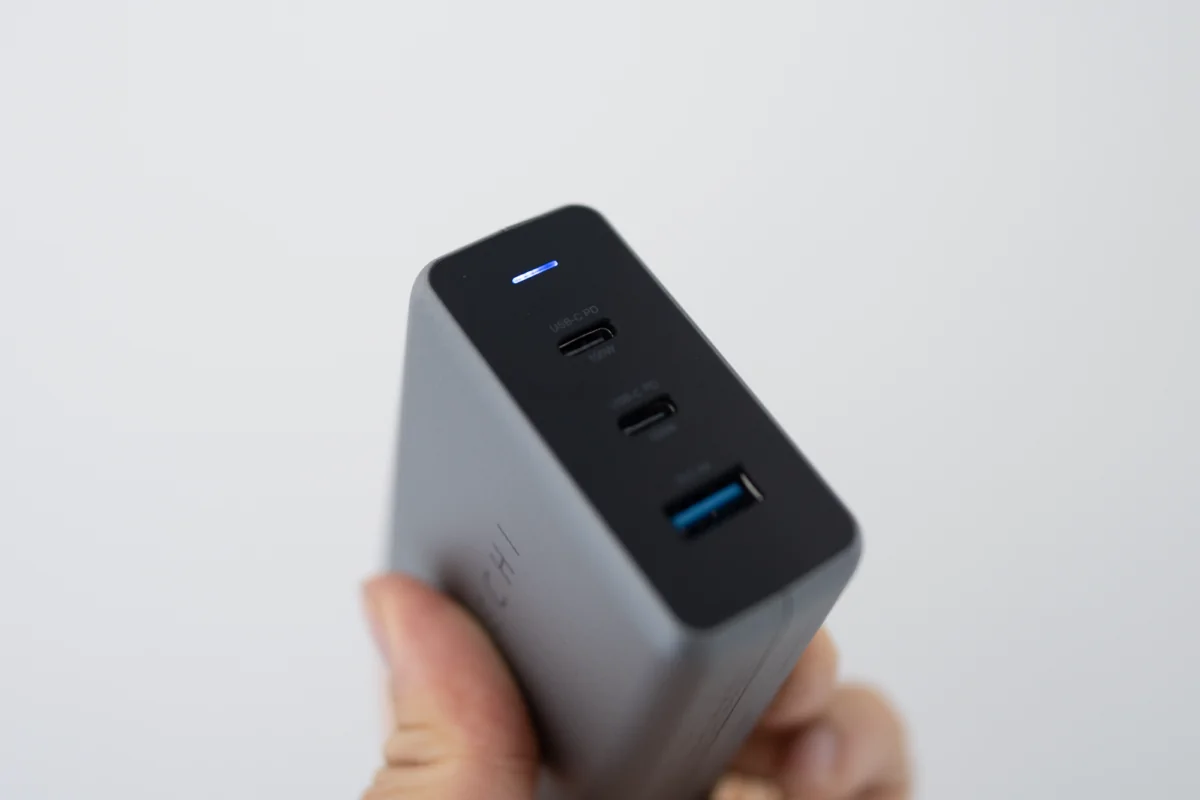
USB-C Power Delivery (PD) is a negotiation protocol: a charger advertises power capabilities, the device requests a target, and both sides agree on voltage and current. The “60W, 100W, 240W” numbers you see on chargers and docks refer to maximum negotiated output under specific PD versions and profiles, not a guarantee that every device will draw that much. A phone may request 18W or 27W even when the charger is rated far higher, while a laptop might request 60W or 100W depending on its power budget and battery state.
PD also depends on the cable. Many USB-C cables are rated for only certain current levels, and some “e-marked” cables are required for higher-power modes. If the cable cannot support the negotiated current, the charger may fall back to a lower profile or refuse the higher power contract, which is why a 100W charger can still behave like a slow charger with the wrong cable.
240W PD is a newer, higher-power class intended for larger devices like some docking setups and monitors. Real-world behavior still depends on the sink device (the thing being powered) and the cable’s ability to carry the negotiated current safely.
Where People Get Misled
People often treat the charger’s printed wattage as a “maximum charge rate” for their device. PD negotiation works differently: the device decides what it needs, and the charger supplies what it can after negotiation. If a laptop’s PD controller only supports up to 65W, a 100W charger will not force 100W into it; the laptop will request its supported maximum.
Another common mistake is assuming that any USB-C cable is interchangeable. Cable ratings are not just marketing labels; they relate to conductor gauge, thermal limits, and whether the cable includes an e-marker for higher-power negotiation. A cable that works for 20W charging can overheat or fail to negotiate higher modes when paired with a 100W or 240W charger.
Some buyers also confuse PD with “USB-C charging” in general. USB-C connectors exist in multiple charging standards, including USB Battery Charging (BC) and vendor-specific fast charging. PD is the one that uses explicit negotiation of voltage/current steps, and it is the reason a single USB-C port can support multiple power levels without guessing.
Finally, docks and cables add another dependency chain. A dock may include its own PD controller, power path circuitry, and internal power limits for each downstream port. Even if the upstream charger is 100W, the dock might cap the laptop output at a lower number, and the laptop will request only what the dock can deliver.
How To Match Your Needs
Check Device PD Profiles
Start with the device’s documentation or spec sheet for its USB-C PD input limits. Look for a statement like “USB-C PD up to 65W” or a list of supported voltages and maximum watts. If the device only supports 20V at 3.25A (about 65W), it will not reach 100W even with a 100W charger. A practical aside: many laptop manuals list a maximum wattage for “USB-C power input,” but the actual negotiated wattage can drop when the battery is near full.
Use Cables Rated For The Mode
For 60W and many 100W setups, a quality USB-C cable with appropriate current rating usually works, but the safe approach is to match the cable’s stated PD capability to the target wattage. For higher-power PD, look for an e-marked cable that explicitly supports higher current levels. If you see a cable marketed only for “charging” without any PD or current rating, treat it as a risk—especially for 100W and 240W use cases where thermal limits matter.
Confirm Charger And Port Behavior
Charger output ratings can be per-port or total output across multiple ports. A charger that says “100W max” might split power between ports when multiple devices are connected, which can reduce the wattage available to your laptop. On some docks, the upstream port may negotiate one power level while downstream ports use separate power budgets. A small frustration many people hit: the charger can be capable, but the dock’s internal limit is the bottleneck.
Plan For Real-World Power Draw
Even when negotiation succeeds, the device may not draw the maximum wattage continuously. Laptops often reduce charging power when the battery is warm or near full, and they may request more power during heavy CPU/GPU load. Monitors and accessories connected through a dock can also change the power path. If you want a measurable outcome, use a USB-C power meter inline (a tool that reports negotiated voltage/current and calculated wattage) and observe the wattage under your typical workload.
Educational Case Examples
Scenario A: 100W Charger, Laptop Stays At 60W
A user buys a 100W USB-C charger for a laptop that lists “USB-C PD input up to 65W.” The laptop negotiates a maximum it supports, then settles around 60–65W during charging. When the battery reaches a high state of charge, the laptop requests less power and the reported wattage drops. The user concludes the charger is “underpowered,” but the behavior matches PD negotiation and battery management.
Scenario B: 240W Dock, Random Fallback To Lower Power
Another user connects a laptop to a high-power dock using a cable that works for phone charging. The dock initially attempts a higher PD mode, but the negotiation falls back after the charger detects that the cable cannot sustain the required current. The laptop charges at a lower rate and may show “slow charging” behavior. Replacing the cable with one that is explicitly rated for higher-power PD restores stable negotiation.
PD Limits At A Glance
| Parameter | 60W Class | 100W Class | 240W Class |
|---|---|---|---|
| What the number means | Maximum negotiated output capability | Maximum negotiated output capability | Maximum negotiated output capability for higher-power PD modes |
| Who decides the actual wattage | The device requests a supported target | The device requests a supported target | The device requests a supported target; dock/cable must support it |
| Cable dependency | Usually manageable with quality USB-C cables | Cable rating matters more; e-marking may be required | Cable and e-marking become a frequent limiting factor |
| Common symptom when mismatched | Lower-than-expected charging rate | Negotiation fallback or port power splitting | Unstable negotiation, frequent fallback, or refusal to reach high modes |
Common Mistakes To Avoid
Buying a charger with the right wattage but the wrong connector behavior is a frequent failure mode. Some chargers advertise high wattage, but only on a specific port or only when the other ports are unused. If you plug in a phone and a laptop at the same time, the laptop may receive less than expected because the charger splits its total output.
Another mistake is using a long, low-quality cable for high-power PD. Voltage drop and heat rise with current and cable resistance, and PD negotiation can respond by stepping down. If the cable is warm to the touch during charging, treat that as a warning sign rather than a “normal” outcome.
People also misread “PD 3.1” or “EPR” marketing terms without checking what the device supports. PD version and EPR (Extended Power Range) capability affect which voltage/current steps are available, but the sink device must request them. A charger that supports 240W modes cannot force a device that only supports lower PD profiles to draw more power.
Finally, avoid assuming that a dock is transparent. Docks may include their own power budgeting for USB-A ports, HDMI/DisplayPort, and charging downstream devices. When the dock’s internal power budget is reached, it can reduce the laptop’s available power even while the upstream charger still has headroom.
FAQ
Does A 100W Charger Always Charge At 100W?
No. The device requests a supported PD target, and battery management often reduces draw near full charge. A 100W charger can still deliver 60W or less if that is what the device requests.
Why Does My Laptop Show Slow Charging With A Higher-Watt Charger?
Common causes include a cable that cannot support the negotiated current, a dock that caps output, or a device that supports a lower maximum PD input than the charger offers.
What Makes 240W PD Different From 100W PD?
240W class operation depends on higher-power PD modes and typically stricter cable requirements. The sink device, dock power path, and cable e-marking must all support the negotiated high-power contract.
Do I Need An E-Marked Cable For 100W?
Some 100W setups work with non-e-marked cables, but higher-power negotiation often expects e-marking for reliable operation. If your goal is stable 100W charging through a dock, choose a cable explicitly rated for that use case.
Can USB-C PD Power A Monitor And Charge A Laptop?
Yes, when the dock or monitor supports PD power delivery and the total power budget is sufficient. If the dock splits power across functions, the laptop may receive less than the upstream charger’s maximum.
Author's Insight
USB-C PD behavior follows negotiation rules: the charger advertises capabilities, the device requests a target, and the cable and intermediate hardware must support the negotiated current and voltage. Many “it charges slowly” reports trace back to mismatched cable ratings, dock power caps, or port power splitting rather than a defective charger.
For practical troubleshooting, a USB-C power meter helps confirm the negotiated voltage/current instead of guessing from charging time alone. I also recommend checking the device’s published maximum USB-C PD input wattage and supported voltage steps, then matching the charger and cable to that ceiling.
On a side note, I’ve seen documentation revisions where a laptop’s manual changed from “up to 65W” to a slightly different supported profile after a firmware update (example: a 2023 service note), which can change observed wattage under load.
Key Takeaways
- 60W, 100W, and 240W are maximum negotiated capabilities; the device requests the actual wattage.
- Cables and docks often limit performance more than the charger label does.
- Port splitting and total charger output can reduce laptop power when multiple devices connect.
- Use a power meter or check PD specs to confirm negotiated wattage instead of relying on expectations.